Anime vs Anime How to Redeem Codes
Unlock the code box, paste case-sensitive promos, and claim Emeralds, packs, Coins, and Gems safely.
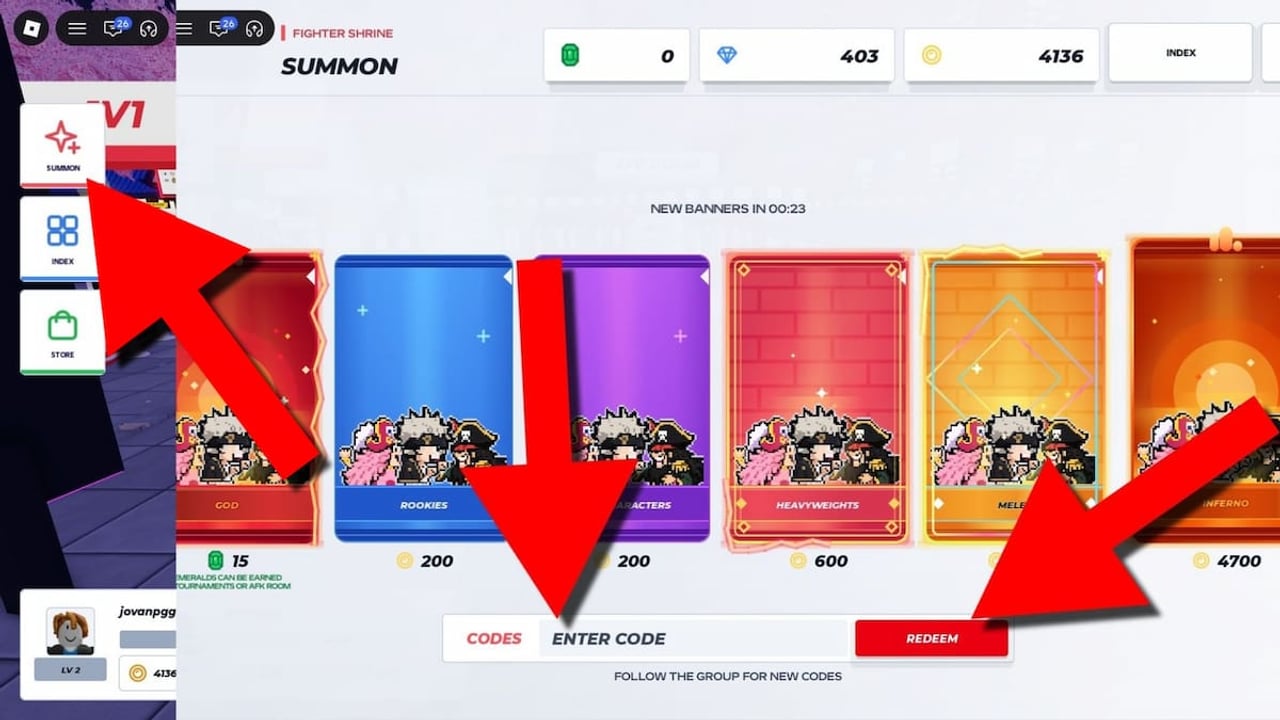
Redeeming codes in Anime vs Anime is simple once the UI unlocks, but new players often miss the tutorial and first Rebirth gates. This page walks through every requirement, the exact Summon-path UI, troubleshooting, and what to do with rewards afterward. For the live list of working strings, open the Codes Hub first, then return here if Redeem fails.
Anime vs Anime is a free-to-play Roblox fighter from SellWater! (place ID 80007766855741). Servers hold about 25 players. Currencies include Coins, Emeralds, and Gems, with Apex Pack and God Pack summons driving the 140+ fighter roster. Codes feed that loop—especially early, when one God Pack can define your first mains.
Requirements before the code box appears
Most reports agree on two unlocks:
- Complete the tutorial. The intro teaches movement and combat and grants a free God Pack. Do not skip dialogue or leave early if the game still marks the tutorial incomplete.
- Finish your first Rebirth. Rebirth is an early progression milestone. Until it completes, the redeem field may stay hidden or reject input even when you found the Summon panel. Full walkthrough: How to Rebirth.
If you joined mid-session on a friend’s teleport, still verify tutorial and Rebirth status in your own progression UI. Codes are account-bound per Roblox user; alt accounts must unlock redeem separately.
Step-by-step redeem path
- Launch Anime vs Anime from Roblox and wait until the lobby HUD fully loads.
- Confirm tutorial completion and that you have performed at least one Rebirth.
- Tap the Summon button on the left side of the screen (not the shop tabs on the far right if your layout differs after UI reworks).
- Inside Summon, scroll to the bottom—the code entry box sits under pack options, not at the very top.
- Click the text field, paste or type the code exactly (case-sensitive).
- Press Redeem. Watch for a success toast and check currency counters or pack inventory.
- Exit carefully so you do not accidentally spend a pack you meant to save.
UI reworks in 2026 (codes like UIREWORK2026, NewSkinsUI!, OldUIToggle!) shuffled panels. If Summon moved after a patch, re-check the left cluster first; the code box still belongs inside the summon flow at the bottom in current reports.
Case sensitivity and copy hygiene
- Codes such as
SkinsAreHere!,Bill1k?, and!dnekeewnostnemanruotfail if you drop punctuation or change case. - Do not add spaces before or after the string.
- Prefer copy-paste from the Codes Hub table over retyping long reversed strings.
- Some codes exist in near-duplicate forms (for example
DokiDoki!andDokiDoki, or87_Star!and87_Star). Redeem each variant separately if both are listed as working.
What success looks like
On success you typically receive one of:
- Flat Emeralds (10, 15, 25, 50, 300, and similar tiers)
- Coins (5k or 10k bundles)
- Gems (for example Onyx at 300)
- Apex Pack or God Pack items added to summon inventory
Open Summon again to consume packs when ready. If you are brand new, read How to Summon before burning every God Pack on impulse. The Getting Started guide covers early mode picks (Training, 1v1, Auto Fight) so you lab pulls before Ranked.
Troubleshooting failed redeems
Invalid / not found
- Recheck spelling against the hub table.
- Confirm the code has not expired after a patch—cross-read the Updates Hub.
No code box visible
- Tutorial incomplete or first Rebirth missing.
- Wrong menu: open Summon (left), scroll down; do not hunt only in Settings.
- Soft UI desync: rejoin a fresh server (25-player lobbies).
Already redeemed
- Each code is generally once per account. Alts need their own unlocks and claims.
Rewards missing in HUD
- Reopen inventory or Summon; some currencies update after a short delay.
- If packs appeared but fighters did not, you still need to open the pack through the summon UI.
Executor or third-party “auto redeem” tools
- Unnecessary and risky. Official redeem is a few taps. For automation talk that is in-game, see the honest Scripts Hub notes on built-in Auto Fight versus unsafe executors.
Priority order when claiming many codes
When you have a long list (common after reading the full hub):
- God Pack codes first (SorryForBadUpdate, BetterUpdateTomorrow, !dnekeewnostnemanruot).
- Large Emerald bundles (SkinsAreHere!, SkinSpin!, LegendaryLuck!, FollowBushidoF).
- Multi Apex Pack codes (Phantom, dnekeewnosretcarahcwen02).
- Remaining Apex Pack, Emerald, Coin, and Gem fillers.
That order protects you if a session crash or patch hits mid-redeem. After packs land, decide whether to chase October 27 standouts (Unohana, Shinji, Ishida, Alucard, Cid, Kaneki, Yami, Escanor, Uzui, Rengoku, Josuke, David, Rimuru, Guts) covered on New Roster and ranked on Best Fighters.
Safety and scams
- Never pay for “private code lists” or Discord DMs selling strings.
- Official community space: discord.com/invite/avsa.
- This wiki does not invent codes; we mirror publicly working promos and remove dead ones when confirmed.
- Roblox account security still matters—codes never require your password.
After redeeming: turn gifts into wins
Codes accelerate collection; they do not teach neutral. Spend time in Training, learn keybinds (they persist across servers as of the October 27 patch), then queue 1v1 or 2v2. Ranked and Tournament modes punish raw pack luck without fundamentals—see Combat and Ranked and Controls. Bots in applicable modes scale harder every 5 wins, so do not assume early bot farms stay free forever (October patch).
If you main a nerfed veteran (Eraser Hero, Sanji, Kaido, Ace, Rivai, Big Mom, Pickle, Boo, Ice Chief, Geta), codes that fund new pulls may be a better investment than forcing outdated kits. Check the Tier List Hub for community-estimate context.
Related pages
- Codes Hub — full working table
- How to Rebirth — unlock the redeem gate
- How to Summon — Apex vs God Pack usage
- Getting Started — day-one path
- Wiki overview — site map of all hubs
Redeem carefully, verify each success toast, and keep this page handy whenever SellWater! ships a new code wave with Ranked, skins, or apology updates.
Frequently Asked Questions
Quick answers to the most common Anime vs Anime questions.
Where is the code box in Anime vs Anime?
Open the Summon button on the left side of the HUD, then scroll to the code field at the bottom of that panel.
Do I need Rebirth to redeem codes?
Yes for most accounts. Finish the tutorial and your first Rebirth before the redeem UI reliably accepts codes—see How to Rebirth for the full gate walkthrough.
Can I redeem the same code twice?
No. Codes are typically one redeem per Roblox account. Near-duplicate strings listed separately can each be claimed once.
What should I redeem first?
Claim God Pack codes first, then large Emerald rewards, then Apex Pack and Coin or Gem fillers from the Codes Hub table.
Codes say invalid but I typed them right—what next?
Confirm case and punctuation, rejoin a server, verify tutorial and Rebirth, then check whether the code expired on the Codes Hub or Discord.